Chapter 8: Tools & Accessories
Complete accessories checklist, deployment tools, and supplementary hardware required for a successful monitoring system installation
A successful cybersecurity monitoring system deployment requires more than the core platform components. A comprehensive set of accessories, cabling, mounting hardware, and supplementary tools is essential to ensure reliable physical connectivity, proper power protection, and efficient ongoing operations. This chapter provides a complete accessories checklist organized by category, with specifications and quantity guidance for each item type.
8.1 Complete Accessories Checklist
The following image provides a visual overview of all accessories and supplementary hardware required for a standard cybersecurity monitoring system deployment. Each item category is illustrated with representative product images and labeled with the standard product designation. The detailed specifications and recommended quantities for each item are provided in the table below.
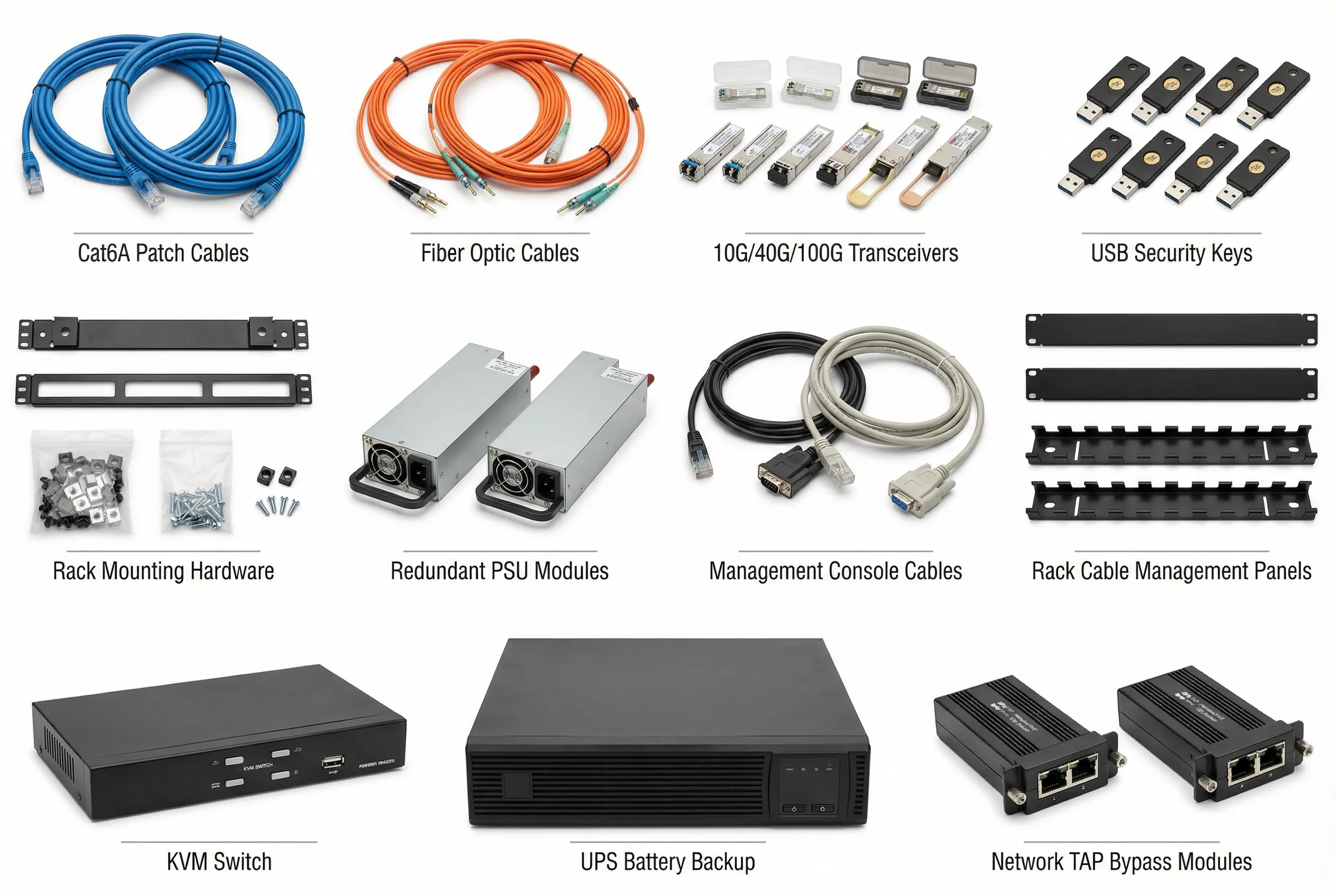
Figure 8.1: Complete Accessories Checklist — All supplementary hardware required for a cybersecurity monitoring system deployment, including network cables, fiber optic cables, SFP/QSFP transceivers, USB security keys, rack mounting hardware, redundant PSU modules, management console cables, rack cable management panels, KVM switch, UPS battery backup, and network TAP bypass modules.
8.2 Detailed Accessories Specifications
The table below provides complete specifications for all accessories in the checklist, including technical requirements, recommended quantities for a standard medium-scale deployment (5 monitoring appliances), and procurement notes. Quantities should be scaled proportionally for larger or smaller deployments.
| Category | Item | Specification | Qty (Medium Deploy) | Notes |
|---|---|---|---|---|
| Network Cables | Cat6A Patch Cables (Blue) | Cat6A, 10GbE, RJ45, 1m/2m/3m lengths | 20–30 pcs | Blue for production data; use different colors for management |
| Cat6 Patch Cables (Green) | Cat6, 1GbE, RJ45, 1m/2m lengths | 10–15 pcs | Green for OOB management network connections | |
| Fiber Optic | LC-LC OM4 Fiber (Orange) | OM4 multimode, LC-LC duplex, 3m/5m/10m | 10–20 pcs | For 10G/25G connections between TAP and collectors |
| LC-LC OS2 Fiber (Yellow) | OS2 single-mode, LC-LC duplex, 10m/20m | 4–8 pcs | For long-distance connections (>100m) | |
| Transceivers | SFP+ 10G SR Module | 10GBASE-SR, 850nm, 300m OM4, LC | 8–12 pcs | For 10G fiber connections to core switches |
| QSFP+ 40G SR4 Module | 40GBASE-SR4, 850nm, 150m OM4, MPO | 4–6 pcs | For 40G uplinks on high-throughput TAP devices | |
| SFP+ 10G RJ45 Module | 10GBASE-T, RJ45, 30m Cat6A | 4–6 pcs | For copper 10G connections where fiber is unavailable | |
| Security Hardware | USB Hardware Security Key | FIDO2/U2F, USB-A + USB-C, IP68 | 10–15 pcs | For MFA on all SIEM admin and analyst accounts |
| HSM Module (Optional) | FIPS 140-2 Level 3, PCIe or USB | 1–2 pcs | For cryptographic key management in high-security deployments | |
| Rack Hardware | Rack Mounting Rails | Universal 1U/2U/4U rails, 19" rack | Per appliance set | Verify compatibility with specific appliance models before ordering |
| Cage Nuts & Screws Kit | M6 cage nuts, M6 screws, 100-piece kit | 2–3 kits | Standard 19" rack hardware; include spare set | |
| Blanking Panels | 1U plastic blanking panels, 19" | 10–20 pcs | Fill unused rack U-spaces for proper airflow management | |
| Power | Redundant PSU Module | Hot-swap, 80+ Platinum, matching wattage | Per appliance | Ensure PSU wattage matches appliance requirements with 20% headroom |
| UPS Battery Backup | Online double-conversion, 3kVA/2.7kW, 10-min runtime | 1–2 units | Size for total rack load; include automatic shutdown software | |
| Management | Console Cable (RJ45-DB9) | Cisco-compatible, RJ45 to DB9, 1.8m | 5–10 pcs | One per appliance plus spares for initial configuration |
| KVM Switch | 8-port IP KVM, 1U, HDMI/VGA, remote access | 1 unit | Enables remote console access to all appliances without physical presence | |
| Cable Management | 1U Cable Management Panel | 1U, horizontal, with cover, 19" | 4–6 pcs | Place between every 2–3 appliances for clean cable routing |
| TAP Accessories | Network TAP Bypass Module | Matching interface type (copper/fiber), failopen | Per TAP device | Ensure bypass module matches TAP device interface specifications |
8.3 Deployment & Maintenance Tools
In addition to the hardware accessories, a set of software and diagnostic tools is required for deployment, configuration, and ongoing maintenance. These tools enable network engineers and security architects to verify connectivity, test log collection, validate detection rules, and troubleshoot integration issues without requiring access to production systems.
| Tool Category | Tool Name | Purpose | License Type |
|---|---|---|---|
| Network Diagnostic | Wireshark | Packet capture and analysis for verifying log forwarding and TAP operation | Open Source |
| Log Testing | Loggen (syslog-ng) | Generate synthetic syslog messages to test log collector configuration | Open Source |
| SIEM Testing | Atomic Red Team | Execute MITRE ATT&CK technique simulations to validate detection rules | Open Source |
| Network Scanning | Nmap | Verify network connectivity and port accessibility between components | Open Source |
| Configuration Management | Ansible | Automate deployment and configuration of log collector agents | Open Source |
| Certificate Management | OpenSSL CLI | Generate, inspect, and validate TLS certificates for encrypted log forwarding | Open Source |
| Monitoring Validation | Purple Team Exercise Framework | Structured adversary simulation to validate end-to-end detection coverage | Commercial |